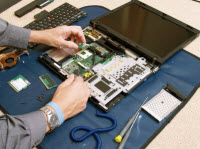
Relevant details of processor, memory, hard drive


desktop_icons
Diagrammatically the path of data travel from the hard disk drive(HDD) to the CPU is shown as follows:
Hard Disk Drive (HDD)-> RAM Memory -> Memory Controller (MCH) -> cache memory -> CPU
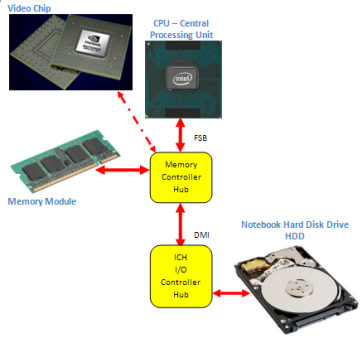 This long path is necessitated by the fact that these components operate at different speeds. In relative terms, CPU is the fastest and the hard disk drive (HDD) being the slowest. The speed of RAM memory and cache memory falling in between the two, with cache memory being much faster than the RAM memory.
Any parameter of these components that speeds up the data travel in this path improves our experience with the laptop.
In earlier models of Intel processors, the cache memory is part of the CPU itself while the memory controller (MCH) stays outside the cpu in the form an additional chip. But later models of Intel processors like Core i3,i5,i7 have all built-in memory controllers.
In AMD processors, the memory controller (MCH), cache memory and the CPU are all packaged together as a single chip aka CPU.
When the memory controller is embedded in the CPU, the memory is directly connected to the CPU bypassing the motherboard chipset thereby enhancing the performance.
With this framework in the background, let us go over some of the parameters of the following components:
- Processor (CPU):
- Clock Speed: Measured in billions of cycles/sec or GHz. (Please note: 1 cycle/sec = 1 Hz and the term Giga stands for the quantity billion and hence the term GigaHertz or GHz for short) Higher the clock speed, greater is the speed with which the instructions are executed and hence greater is the performance
- FrontSideBus (FSB): Measured in million of cycles/sec or MHz. (Again the term Mega stands for the quantity million and the term MegaHertz or Mhz for short) Greater the FSB, faster will be the data travel to the CPU, and hence greater is the performance
- Number of Cores: A CPU with 4 cores is known as QUAD CPU, while a CPU with 2 cores is known as Duo CPU and a CPU with a single core is known as Solo CPU. Theoretically more the number of cores faster will be the processing of instructions as the processing will be shared between the number of cores available. Imagine 4 waitresses(Quad Core) waiting to take your order at the restaurant table vs. that one waitress(Solo) who has disappeared in the kitchen with your order and you are left wondering what happened.
Intel Core i3 processors come in dual core configurations, while Core i5 processors come in either dual or quad core modes and Core i7 processors come with either four or six cores. - Number of bits: It does matter whether it is a 64 bit processor or a 32 bit processor, for it decides the performance. A 32 bit processor can only support 32 bit software, while a 64 bit software can support both the 64 bit software as well as 32 bit software (thus retaining backward compatibility). A notebook running 64 bit operating system is faster and more efficient than the one with 32 bit OS.
Also note that a 32 bit operating system is limited to addressing a maximum of 4GB memory and a 64 bit OS can support memory greater than 4GB thus can run multiple applications simultaneously.
Earlier models of cpu used to be 32 bit processors. Lately 64 bit processors have become the norm.
- Fabrication Technology: The technology adopted in manufacturing the processors has a bearing on their energy efficiency. A processor made with 32 nanometer (nm) technology runs cooler and uses less energy (hence longer battery life) than the one made with 45 nm process.
Intel Core i3 processors are made with 32 nm process, while Core i5s are 32 or 45 nm processors and Core i7s are made with 45 nm technology. So if battery life is of greater importance than performance, the choice is to go with notebooks run by Core i3 processors.
You may want to click on this clockspeed-demo to get an idea about how higher clock speed helps you to get more done in less time. (SOURCE: www.Intel.com)
You may want to click on this fsb-demo to see visually how the FrontSideBus (depending on its speed) can help or hinder the dataflow from the CPU to other components and vice versa. (SOURCE: www.Intel.com)
Note: Lately laptops with 2nd Generation Intel Core i3, i5 or i7 processors (with emphasis on performance and energy saving) have started appearing in the market. It would help to know to the difference in cost for such laptops with those run by first generation Intel Core processors. Then you make an intelligent trade off.
- Cache Memory: Measured in MegaByte or MB for short. Greater the size of the cache memory, less is the necessity for the CPU to reach the RAM memory for additional data. Hence faster will be the processing.
- RAM Memory:
- Size of memory: Measured in GigaByte or GB for short. Greater the size of the memory, more data, and hence more applications can be stored in the RAM for CPU to access. Hence better will be the performance in a multitasking environment.
- Technology adopted for data transfer from the RAM to the CPU: DDR vs. DDR2 vs. DDR3. DDR2 allows for higher clock speed compared to DDR and hence more gets done in a given time. The newer DDR3 technology offers nearly twice the bandwidth of DDR2 and hence is suited for graphics-rich applications. It allows for lower power consumption too and hence makes possible longer battery life.
- Clock speed: Measured in MHZ. Higher the clock speed better the performance. Given the technology choose the memory module with the greater clock speed. For example choose a laptop configured with DDR3 1333 MHZ memory modules over the one with DDR3 1066 MHZ memory modules if your budget can permit.
- Size of modules per slot: Go for the laptop with greater size of modules per slot. For example consider two laptops (comparable in all other specifications) that come with 2GB DDR3 1066 MHZ. Upon closer scrutiny, you find that both have two memory slots. While one comes with 2GB per slot leaving the other slot empty and the other comes with 1GB per slot x 2 making up the same 2GB total memory.
Which one would you buy?
I suggest you go with the first, because the first has an empty slot that you can upgrade at a later date, to whatever biggest size of memory module available in the market. Whereas in the second case, when you upgrade, you need to discard the 1GB memory module that came originally with the laptop.
- Hard disk drive (HDD):
- Interface of hard drive with the motherboard: Whether it is Serial ATA(SATA) or Parallel ATA (PATA) interface that is adopted in the laptop. PATA is slower compared to SATA in terms of data transfer and PATA technology is slowly being phased out. Choose SATA over PATA always.
- The technology behind the hard drive itself: Whether it is driven by conventional mechanical means or now popular Solid State Drive (SSD) technology. SSD drives use Flash memory to store data. SSD is considerably faster than mechanical drive for data transfer (notably for random access) and less power intensive. By being faster it increase the data transfer rate to the CPU and by being less power intensive makes the laptop battery last longer and you can use the laptop hours on end without having to look for a wall socket. Such advantages come at a price. SSDs are more expensive compared to conventional mechanical hard disk drives for a given size.
A more recent trend is the appearance of hybrid hard drives in high end laptops. Hybrid hard drives combine the advantages of both the SSDs and the conventional mechanical hard drives. They can access data faster and also have the ability to store large volume of data without costing a fortune. - Speed of rotation: This is applicable for conventional mechanical hard disk drives only. Higher the speed of rotation, greater is the rate at which the data will be accessed for read or write. Go for a laptop with a hard drive that is running faster if you can afford the price difference.
You may want to click on this cache-demo to see visually how higher cache memory helps in enhancing the CPU performance. (SOURCE: www.Intel.com)
With the details seen this page and the previous page, you are ready to move on to Laptop key features and some additional parameters in your purchasing decision.
<- Prev Anatomy of a laptop
Next->Laptop key features and their parameters